Old photo restoration before and after
The bot has four modes for old pictures. Each one changes something different, and the example pair on this page shows the repair-and-colorize mode. It is our own sample pair, so you can judge the style of the result before you send your own.
- 2 credits per image
- Result in 1–2 minutes
- No sign-up
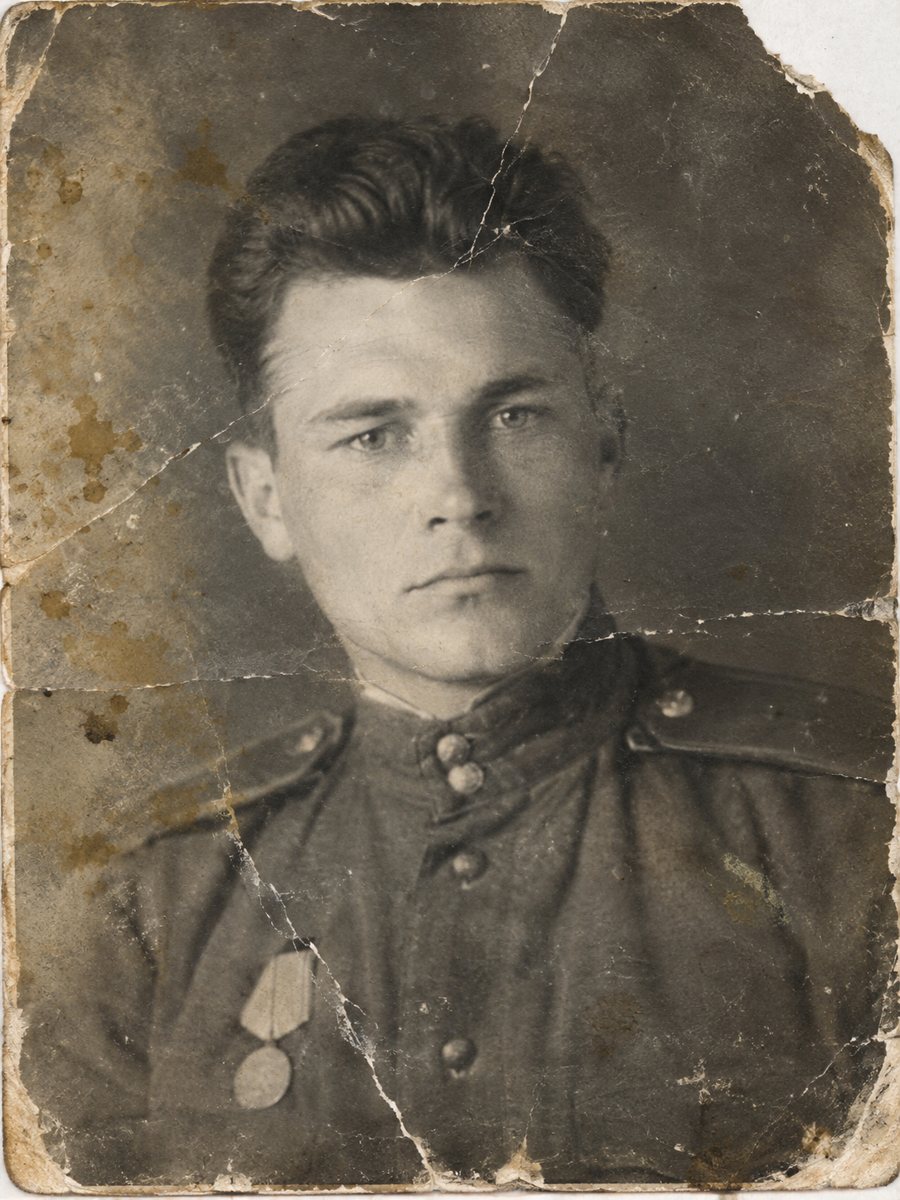
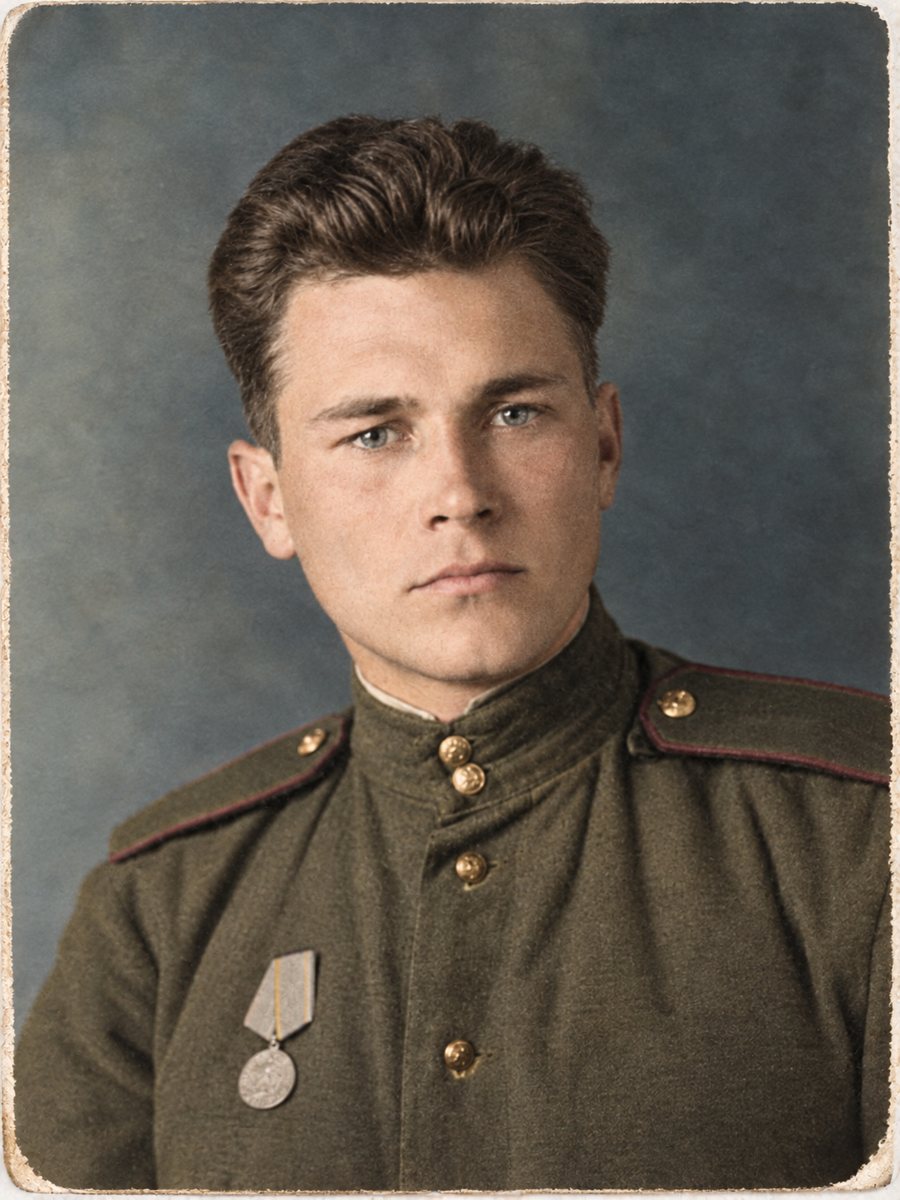 BeforeAfter
In short: See what restore, sharpen, colorize and the full mode do to an old photo, with the site's own before and after pairs. 7 images free, then from 49 Stars.
- Where: the VisuMate bot in Telegram, no app or sign-up.
- Cost: 2 credits per image, 7 images free, then packs from 49 Telegram Stars.
- Time: 1 to 2 minutes per image, rerun with a new instruction at the same price.
- Credits never expire, there is no subscription and no auto-renew. You pay once for a pack inside Telegram with Stars.
When you need this
- You want to see a result before you spend credits.
- You are unsure which mode fits your photo.
- You worry that AI will make everyone look different.
How to do it
- 1
Start from the button on this page and press Start in Telegram. The restoration menu opens with all four modes.
- 2
Pick the mode that matches the main problem and send the photo as a file (document). Add a short caption.
- 3
In 1-2 minutes you get the result. Compare it to the original at full size.
Try it on your own photo: 7 images are free, no sign-up.
Make it in TelegramRestore, sharpen, colorize, full
The restore mode removes scratches, creases, stains, dust and fading, and rebuilds missing fragments. Black-and-white stays black-and-white. The sharpen mode cleans blur, noise and compression. The colorize mode adds natural colors to a black-and-white photo and keeps the grain. The full mode does restoration and then colorizing in one run. Each run, in any mode, is 2 credits, and a rerun costs the same again.
How to read the sample pairs
Look at three things: the faces, the edges and the damage that was removed. Faces should look like the same person with cleaner skin and clearer eyes. Edges should be firmer, without outlines around them. Damage should be gone without smearing the pattern underneath. The sample pairs here are single examples, so a different photo will give a different result. They do not predict yours.
What to expect on your own photo
Light damage tends to come out well. Heavy damage, especially on faces, is reconstructed by the AI, and the result may not look like the person. Strong motion blur and very small originals cannot be fully recovered, and the AI adds detail by estimation. The bot returns a good resolution for screens and small prints, with no fixed pixel size, so check the result before printing.
Tips
- Choose by the main problem: damage, blur, no color, or several at once.
- Compare the sample pair with your own photo. Light damage and heavy damage give very different results.
- Use the free credits to test one photo in two modes.
- Keep every original. The first scan is the only true record.
Questions and answers
Are these real customer photos?
They are sample pairs prepared for this site to show the style of each mode.
Which mode should I start with?
Pick by the main problem. Use the full mode when a photo is both damaged and black-and-white.
Will the result match the sample?
No two photos are the same. The samples show style, not a promise.
Can I try more than one mode on the same photo?
Yes. Each run costs 2 credits, and 15 free credits cover 7 runs.
What if I do not like the result?
Rerun with a different caption. A rerun costs the same as the first run.
What the bot does not do
- Does not print photos and does not retouch passport or ID photos.
- Does not promise a fixed pixel size. Check the result at full size before printing.
- Heavily damaged faces are reconstructed by AI and may not look like the person. Compare with another photo.
- Does not make video or animate the photo.
More in "Photo restoration"
- What AI photo restoration can and cannot doA plain list of strengths and limits: scratches, stains and fading are fixable, while lost faces and fine...
- Restore a photo with a damaged faceRestore a photo where the face is torn, scratched or worn away. What gets rebuilt, what gets guessed, and...
- Restore an old photo with a Telegram botSee how a Telegram bot restores old photos: start, send a file, add a caption and receive the result in...
- Old photo restoration for beginnersNo experience is needed. Learn what restoration means, which problems AI fixes well and how to try the...